Create Listing Contract
As a Seller Agent, you can create a Listing Contract by providing the following essential details:
- Buyer’s Email
- Buyer’s Name
- Property Address
- Listing Price
To Create New Listing, visit the Bhumio Dashboard Page and Click + Listing Contract button as shown below.
Starting a New Contract
Enter the required details in the form provided.
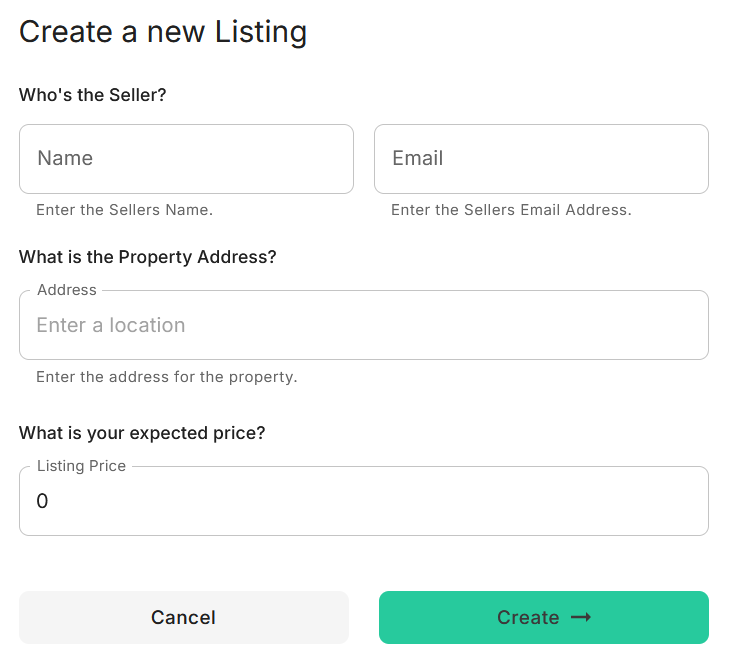
After clicking Create →, the system will generate a DRAFT Listing Contract.
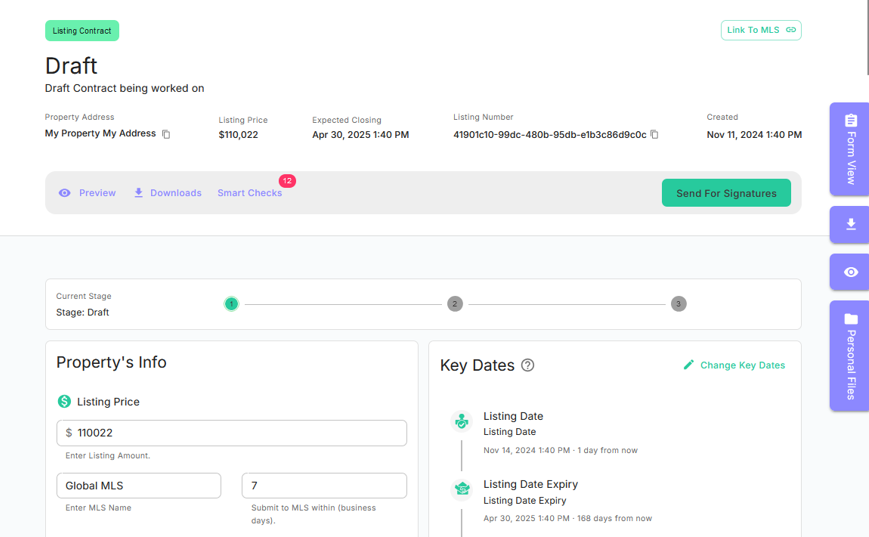
The system will automatically include the required listing disclosures. From here, you can:
- Property's Info: Modify the Listing Price or add/edit Seller, Agent, or Coordinator details.
- Key Dates: Update contract dates or add additional Buyers, Sellers, co-Agents, and Transaction Coordinators as needed.
- Collaboration: Assign form or disclosure tasks to the Seller for completion.
- Commissions: Edit the Listing Broker Commission details.
- Listing Documents: Upload listing-related documents like PCD and disclosures.
- Media/Photos: Add media or invite photographers to upload property videos or photos.
- Home Equity Theft Prevention: Input details such as Mortgage Due, pending actions, or Tax Liens.
Once all contract details, documents, and e-sign tags are finalized, click Send for Signature to notify the Buyer via email.