Offer Details
Navigate to the Offer Details card on the Purchase Contract page. The system will automatically retrieve Offer Details from the MLS listing. If any changes are required, you can edit the following:
- Offer Price
- Deposit
- Depository Bank
- Deliver to Listing Broker within (# Days)
- Property Details: Includes City, State, Lot Size, Zip Code, Property Tax ID Lot, Property Tax ID Block, Property Tax ID Section, APN for the property, and County.
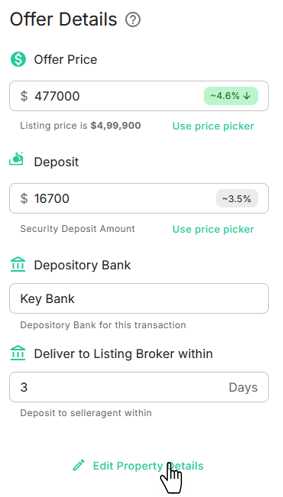
To edit property details, click the Edit Property Details
icon located at the bottom of the card. A dialog box will appear for entering Offer Details, as shown below: